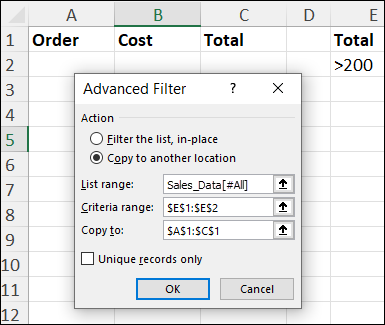
See how to filter Excel data and copy the results to a different worksheet, without using macros.
Continue reading “How to Send Excel Data to Another Sheet-No Macros”
Videos, Humour & more

See how to filter Excel data and copy the results to a different worksheet, without using macros.
Continue reading “How to Send Excel Data to Another Sheet-No Macros”
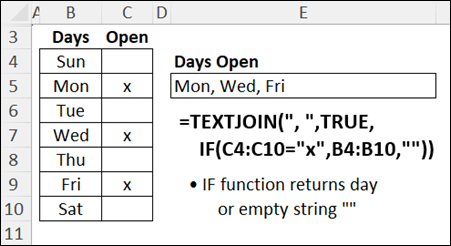
To quickly combine text and numbers from multiple cells in Excel, use the TEXTJOIN Excel function. Sarah shows the steps in this 3-minute video.
To make your Excel formulas easier to read and manage, you can create Excel named ranges. In the video and steps below, I show how to name a range of cells in Excel, and the simple steps to use that name in a formula.
Continue reading “Create Excel Named Ranges for Easy Formulas”
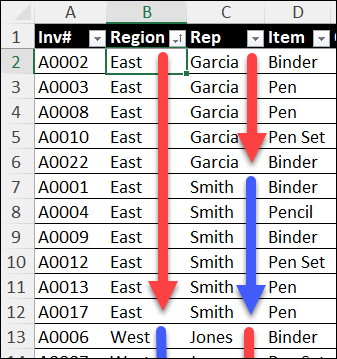
Sorting data in Excel is quick and easy, if you only need to sort by a single column, or even two columns. For a large table, sorting can be more complicated, if you need to sort by 3 or more columns. Today, I’ll show you how to sort multiple columns in Excel so your data is quickly organized the way you need it. Whether you’re sorting by two, three, or more columns, this guide will help you through it!
Continue reading “Sort Multiple Columns in Excel Step-by-Step”
Have you ever opened an Excel workbook and noticed a large Page 1 watermark in the middle of your worksheet? See why that happens, and how you can fix it.

Continue reading “Remove Page 1 Watermark in Excel-Easy Steps”
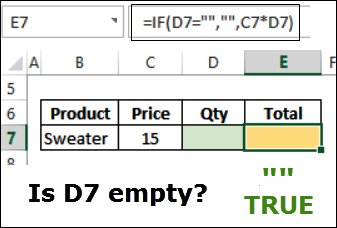
Use the Excel IF function when you want to test something. The IF formula will show one result if the test result is True, and a different result if the test result is False.
Continue reading “Video – How to Make a Simple IF Formula in Excel”
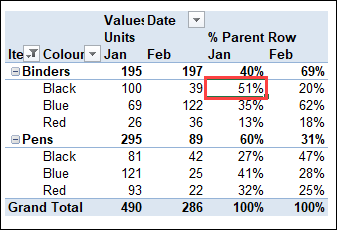
In an Excel pivot table, you can use built-in custom calculations, for a different view of the data.
For example, in this video I set up the pivot table to show what % of monthly sales were Binders, and what % for each colour – red, blue, and black.
Continue reading “Video – Show Percent of Subtotal – Excel Pivot Table”
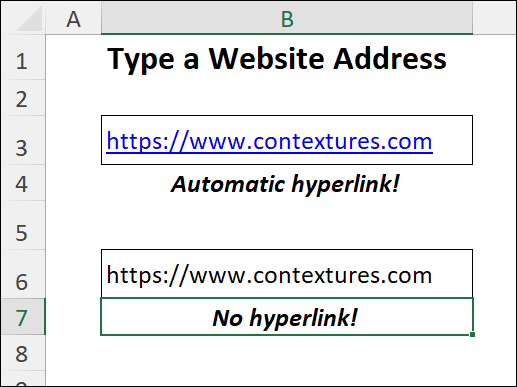
When you type an email address or website URL in Excel, it might turn into a hyperlink automatically. In the video below, see how you can quickly undo that hyperlink, or stop automatic hyperlinks from happening, with a quick and easy Excel trick.
Continue reading “Remove and Prevent Automatic Hyperlinks in Excel”
Did you ever set up your Excel workbook exactly the way you want it, with headings in a freeze pane at the top, and hidden gridlines, and other settings? And then one day, all of those settings disappeared? Why did that happen, and how can you prevent that from happening again?
Continue reading “Why Excel Freeze Panes Settings Disappear Prevent Problem”
If you get pivot table refresh errors, this video shows how to troubleshoot those errors and try to fix them. For example, one common error is, “The PivotTable field name is not valid”. Or, you might see this error: “PivotTable report cannot overlap another PivotTable report.”
Continue reading “Troubleshoot Excel Pivot Table Refresh Errors”
It was Robert Burns Day on Wednesday (January 25th), so I asked ChatGPT to write an Ode to Excel, in the style of Burns’ poem, Address to a Haggis. The results were entertaining, and inspired me to prompt it for an Excel song, in the style of a sea shanty. See if you enjoy the results!
Continue reading “Microsoft Excel Sea Shanties – Lyrics by ChatGPT”
Last week, I had fun with a Shakespearean sonnet about Excel problems, written by ChatGPT. So, to keep myself further entertained, I tried a different type of poetry this week – a limerick!
Have you experimented with ChatGPT, to get AI answers to your important questions? I’ve had mixed results, asking ChatGPT to write Excel formulas, and VBA macros. Some responses are good, and others are overly-confident nonsense!
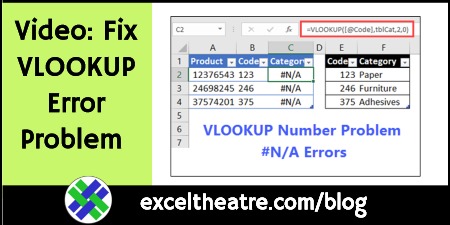
Sometimes a VLOOKUP formula returns an #N/A error, even though you can see the value you’re looking for in the lookup table. The most common cause for this is a text “number” in one place, and a real number in the other place. See how you can fix that VLOOKUP problem.
Continue reading “Fix Excel VLOOKUP Error Problem Video Steps”
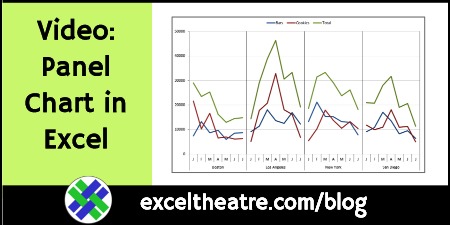
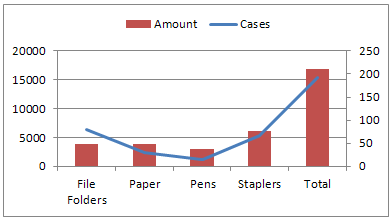
In Excel, there’s no built-in Panel Chart type, but you can create line panel charts, like the one shown below. Watch a video, to see the steps, and there’s a transcript too, and a link where you can download the sample Excel file.
Continue reading “How to Make Panel Chart in Excel – Video Step-by-Step”
On TikTok, I follow Bryan Nothling aka thebnoth, because he’s funny, and he’s Canadian! His “working from home” videos have brightened my days, and he has over 200K followers, so I’m not the only person who enjoys them.
Do you use the CONCATENATE function in Excel, to combine the values from multiple cells? Or are you using the TEXTJOIN function now? If your version of Excel has that function, it’s time to start using it!
Continue reading “Combine Cell Values With Concatenate or TextJoin”
If you use Excel at work all day, do you keep using it when you get home? Excel is a great tool for making lists – with or without formulas!
If you use TikTok, have you stumbled across any Microsoft Excel tip videos yet? It’s a fun way to pick up a few new Excel tips and tricks for your spreadsheet toolkit!
Sometimes it’s easy to make an Excel chart, and sometimes a struggle. There are days when you feel like a superhero, if you just manage to build a simple chart, and change the colours in it!
Here are a couple of short videos that show how to work with Excel pie charts, and win the battle.
Continue reading “Excel Humour 2022-01-10 Excel Chart Superhero”
The holidays are over, and it’s time to get back to work. Do you remember how to use Excel?
Bill Jelen is the the king of all Excel media! In addition to his MrExcel website, and his book publishing empire, and his Excel podcasts, Bill has been on YouTube since July 23, 2006 – almost 15 years ago! Let’s take a look at it.
Continue reading “Excel YouTube Channel: MrExcel by Bill Jelen”
Here’s a bit of Friday fun, with Excel song videos by professor Clint Tuttle. I used to look forward to his videos, in December and April, when the school terms ended.
Continue reading “Friday Fun: Excel Songs by Professor Clint Tuttle”
Where is Excel headed? On the Forward Thinking CFO podcast, Brian Jones (Head of Product, Excel) discusses Microsoft’s strategy for Excel.
There are two 30-minute episodes, and you can listen to both of them below.
Continue reading “Where is Excel Headed? Brian Jones from Microsoft Explains”
Microsoft Build starts tomorrow, May 25th, and runs until May 27th. Are you registered to attend the online sessions this year?
If you love Excel, and who doesn’t, be sure to sign up for Excel Weekend 7. It’s a free online event that’s coming up soon!
Continue reading “Sign Up for Free Excel Weekend 7 in June 2021”
Do you ever use check boxes on your Excel worksheets? They’re handy for choosing options, or marking completed items in a To Do list.
Continue reading “Make Excel Check Boxes Look Better with Formatting Tricks”
Chandoo started a new Excel series on his blog — How to create a fully interactive Project Dashboard with Excel.
In this video for Part 1, Chandoo shows how to set up a Project Gantt Chart, and 3 more lessons in the series are coming.
Continue reading “Excel Dashboard Video Project Gantt Chart”How long does it take your boss to break your latest workbook? Hours? Minutes? Can you use magic to fix the Excel problems that they cause, even during a full moon? If not, call your Mom, and maybe she can help.
Continue reading “Freeze Panes-Save-Excel Tweets Roundup 20200529”
Do your work-from-home friends call for Excel help? Do they forget to save their work, and have AutoSave turned off? If so, send them an invoice, and be sure to include their zip code in the total amount.
Here’s this week’s collection of Excel tweets, for your Friday entertainment. Which one sounds like something that you could have posted? And watch the video below, if you too want to make VLOOKUP work properly!
Is your Excel file so complicated that you’re afraid to breathe near it? If you take out a few of the pie charts, it might work better.
Could you talk about Excel for days? Are you already doing that? Is your dog tired of listening to you, and ready to pass an Excel test? Maybe the sound of a giant pivot table crashing will get you to stop!
Now that you’re working from home, do you spend your days yelling (out loud) at Excel? Or are you too busy crying, because your workbook didn’t save? Or did Elon Musk’s Excel list, with its merged cells, make you cry?
Here’s this week’s collection of Excel tweets, for your Friday entertainment. Which one sounds like something that you could have posted?
What’s your Excel confession? Does it make you want to throw your computer out the window? Do you use dirty hacks? Don’t be embarrassed – we all have Excel secrets!